
Poshan Calculator PDF Download: How to Get and Read Your Child’s Growth Report
The first time I opened that PDF, I’ll be honest, the color codes made more sense than any explanation I’d gotten in person. Green next to her weight-for-age meant normal, no drama needed. But it was the height-for-age line sitting in yellow that made me pause. I didn’t need a doctor to tell me something needed a closer look. I just needed to see it laid out plainly, in a document I could actually hold on to, compare next month, and hand over at her next check-up without fumbling through half-remembered numbers from a slip of paper.
A few weeks later, a neighbor mentioned she’d been using something called the Poshan calculator on her phone to track her son’s weight and height herself. I typed it into Chrome that evening after dinner. And the part I didn’t expect it generated a PDF report. An actual document with colored indicators and percentile ranges I could save and bring to the doctor.
That was the first time I felt like I was holding real information instead of a vague reassurance.
Quick Answer:
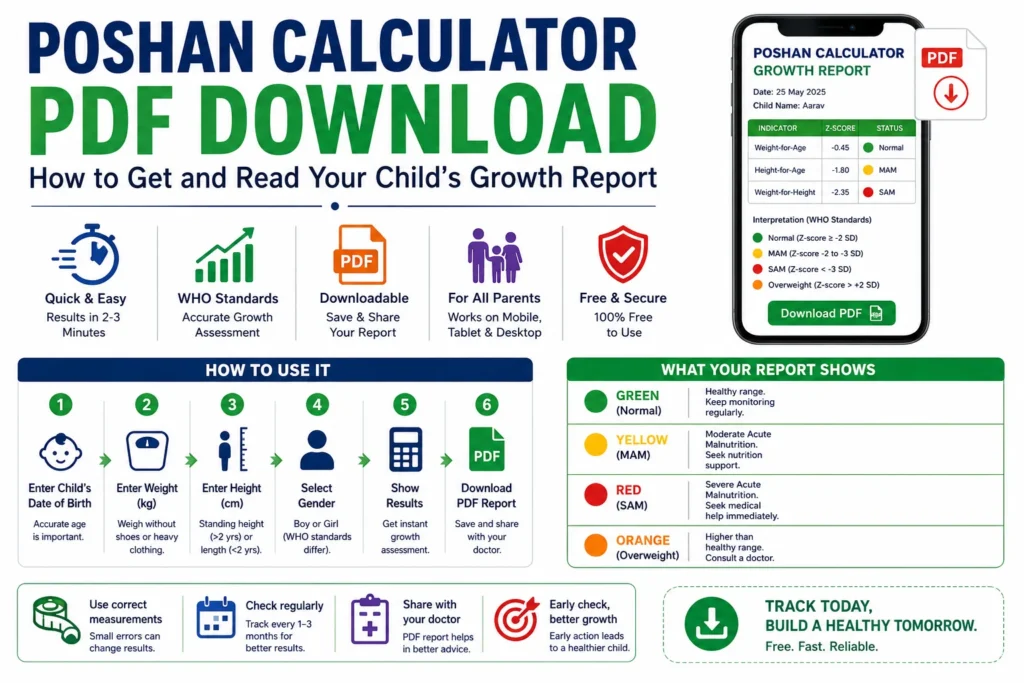
The Poshan calculator PDF download is available directly after entering your child’s age, weight, and height on the tool’s results page. The report uses WHO Child Growth Standards to show weight-for-age, height-for-age, and weight-for-height indicators in color-coded form: green for normal, yellow for MAM, and red for SAM. It’s free, works on mobile, and takes under three minutes to generate.
What the Poshan Calculator PDF Download Actually Does
Let me tell you what it actually does when you sit down and use it. You enter your child’s date of birth, current weight in kilograms, and height in centimeters. The tool runs those numbers against WHO Child Growth Standards and gives you three separate readings, not one number, three. Weight for age. Height for age. Weight for height.
Each one catches something different. A child can look fine on weight-for-age but still show stunting on height-for-age, which means they’ve been managing nutritionally for so long that their body just slowed down growing. The Poshan calculator PDF captures all three together, with color indicators and z-scores, in a format you can actually save.
What most parents don’t realize: the PDF is not just a summary. It’s a dated record. Every time you generate one, you have a time-stamped snapshot of your child’s nutritional status, which matters enormously if you’re tracking progress or showing a doctor a pattern.
How to track child growth month by month
The Reality of Paper Growth Charts at the Anganwadi
Paper ICDS growth charts are actually, scratch that. Let me describe what I’ve actually seen. The kind that gets photocopied from a photocopy until the numbers are slightly blurry. The Anganwadi worker plots a dot with a pen. Sometimes the dot falls between gridlines. Sometimes the chart is two years old, and the child’s name is written over a correction.
I’m not criticizing the workers. They’re often managing 40 to 80 children in a session with limited time and, in many areas, no reliable power for a printer or device. The ICDS growth monitoring system was designed for scale, not precision.
But there’s a real consequence. A 2019 study in the Indian Journal of Pediatrics found that plotting errors in manual growth monitoring occurred in over 30% of records reviewed across rural centers. That’s not negligence; that’s the system’s ceiling.
The paper chart tells you something. It just can’t tell you everything, and it can’t be downloaded and emailed to your pediatrician.
Side by Side: What Actually Differs
|
The honest limitation of the digital tool: it depends entirely on the accuracy of what you enter. If you weigh your child in winter clothes, or measure height with shoes on, or round up by a centimeter, that cascades into the result. The tool is only as precise as the measurement you bring to it.
But that’s a solvable problem. A paper chart with a misread entry isn’t.
How to Use It for the First Time
I expected it to be more complicated than it was. It wasn’t.
- Open any browser on your phone or computer and search “Poshan calculator” or go directly to the tool’s website.
- Select your child’s sex. This matters because WHO growth standards differ by sex.
- Enter the date of birth carefully; a wrong birth year changes every result.
- Weigh your child without shoes or heavy clothing and enter the weight in kilograms.
- Measure standing height (for children over two) or lying length (under two) and enter it in centimeters.
- Click “Show Results,” then look for the PDF download or print option on the results page.
The tip most first-time users miss: generate the PDF before closing the page. Some versions of the tool don’t store results once you navigate away; the report is gone.
The whole thing takes less time than the wait at a government health center.
Reading Your Results Without Panicking
The Poshan calculator PDF uses color-coded bands for each of the three indicators.
Green means normal
Your child’s measurement falls within the WHO healthy range for their age and sex. No immediate action is needed; just keep monitoring every one to three months.
Yellow means MAM: Moderate Acute Malnutrition
This is a real flag. It doesn’t mean crisis, but it does mean your child needs nutritional support and a follow-up with a health worker or pediatrician within the next two weeks.
Red means SAM: Severe Acute Malnutrition
Don’t wait on this one. SAM requires immediate intervention, usually through the NRC (Nutrition Rehabilitation Center) system or a physician. The PDF will show this clearly. Take it seriously.
Orange means overweight
which is increasingly common and equally worth addressing with a doctor.
The reason you check all three indicators together is that a child can show green on weight-for-age but red on weight-for-height, which is wasting, a different condition with different urgency. One number would have missed it.
Errors Nobody Warns You About
The most common mistake is entering height in meters instead of centimeters. If your child is 91 centimeters and you type 0.91, the tool reads it as an infant, and your results will look like SAM even for a perfectly healthy three-year-old. Always use centimeters.
The second mistake is using age in months incorrectly. A child born on March 15, checked on June 10, is not “3 months old”; they are 2 months and 26 days. Close, but the tool does the math for you if you enter the birth date correctly. Let it.
Third: measuring height against a wall without a flat surface under the child’s feet. Even a small tilt produces a 1–2 cm error, and that matters in children under 5, where every centimeter affects the height-for-age reading.
Fourth, and this one trips up people using the free child growth tracker for the first time: they select “length” when they mean “height.” Length is for children under 24 months, measured lying down. Height is for children standing. The WHO standards account for this difference; mixing them up skews the result.
Real Questions, Straight Answers
Final Thoughts:
The slip of paper from that Anganwadi visit is still in a folder somewhere. 10.8 kg, theek hai, thoda kam. I didn’t know what to do with it then.
“Probably fine” and “actually knowing” feel completely different, especially when it’s your child’s growth you’re guessing about.
If you haven’t used the Poshan calculator yet, open it the next time you have your child’s weight and height handy. Generate the PDF. Save it.
You’ll want to have it.